Zahi Theme Features
Zahi theme is a Hugo theme designed specifically for digital gardens and Arabic blogs. You can learn about Programming Basics and Modern Web Development through the linked articles.
New Features
🔗 Wiki Links
The theme supports Obsidian-style links using double brackets Page Title. Valid links appear in green, and broken links appear in red.
Example: Programming with JavaScript - Non-existent link
🕸️ Interactive Knowledge Graph
Each page contains an interactive graph showing:
- Linked Pages - in green
- Tags - in orange with dashed lines
- Zoom and drag capability
You can view the complete site graph.
📚 Educational Series
A new feature for organizing articles in connected series:
- Series Page - display all series at
/series/ - Progress Bar - shows your position in the series
- Easy Navigation - previous and next buttons
- Part List - collapsible/expandable
To use, add to the article frontmatter:
series: "Series Name"
seriesOrder: 1
seriesDescription: "Series description"
🔍 Instant Search
- Press
Ctrl+KorCmd+Kto open search - Quick search in titles, content, and tags
- Highlight matching results
📍 Roadmap
You can add roadmaps for your learning journey:
Core Features
🚀 Outstanding Performance
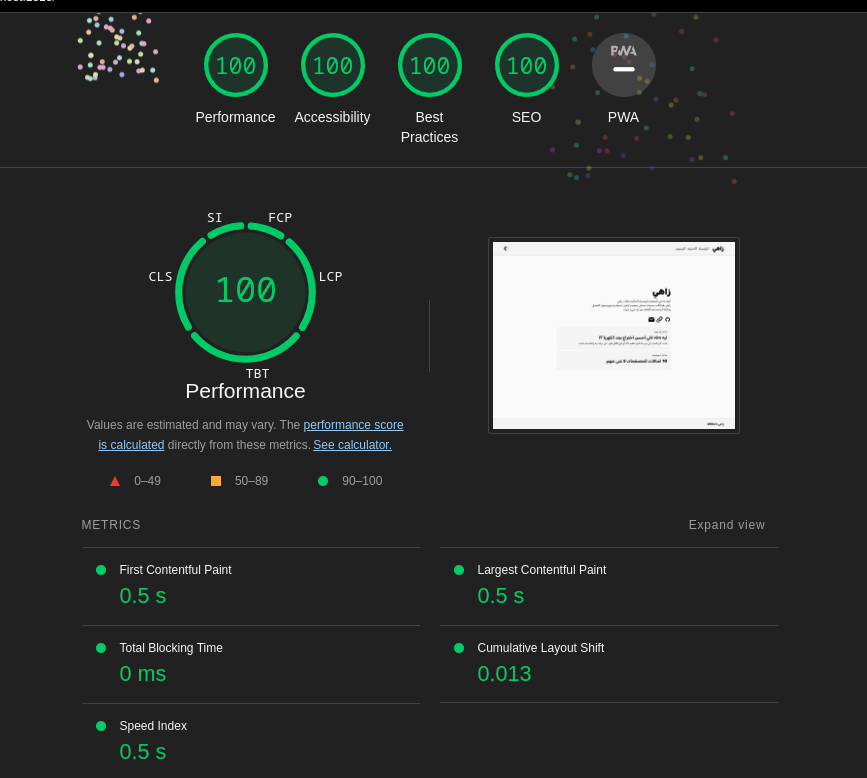
The theme features high performance and excellent loading speed, ensuring a smooth and comfortable experience for users.
💡 Collapsible Table of Contents
- Automatically appears for long articles
- Collapsible and expandable
- Quick links to sections with smooth scrolling
📌 Pinned Articles
Allows pinning important articles on the homepage:
pinned: true
🏷️ Tags and Categories
- Easy content categorization
- Dedicated page for each tag
- Tag cloud on homepage
Check out Programming with JavaScript for more examples.
💬 Disqus Support (Comments Section)
Enables interaction with readers through Disqus comments:
[services]
[services.disqus]
shortname = 'your-shortname'
📄 Pagination
Allows dividing content into separate pages to facilitate browsing and improve user experience.
🎨 Syntax Highlighting
Distinguishes and makes code clearer with a quick copy button:
console.log("hello world from Zahi!")

function setupZahi() {
    return "Zahi is the best"
}

setupZahi()
# Python example
def greet(name):
    return f"Hello {name}!"

print(greet("Zahi"))
📱 Responsive on All Screens
The theme displays excellently and responsively on all screen sizes, ensuring a consistent experience for users across all devices.
🌓 Dark Mode and Light Mode
Allows choosing the user’s preferred mode between dark and light:
- Toggle with one click
- Saves preference automatically
- Follows system settings by default
📜 English Article Support
Supports creating and managing articles in English:
direction: "ltr"
📊 Homepage Statistics
Display quick statistics:
- Number of articles
- Number of series
- Number of categories
- Number of pages
🔄 Article Sharing
Quick share buttons for:
- Twitter/X
- Copy link
Quick Start
1. Installation
# Create new project
hugo new site my-digital-garden

# Add theme
cd my-digital-garden
git init
git submodule add https://github.com/mohamedelhefni/zahi themes/zahi
2. Configuration
# hugo.toml
theme = "zahi"
languageCode = "en"
defaultContentLanguage = "en"

[taxonomies]
tag = "tags"
series = "series"

[outputs]
home = ["HTML", "RSS", "JSON"]
3. Create Content
hugo new posts/my-first-post.md
4. Run Server
hugo server
For more information, see Programming Basics or Git and GitHub.